“E-commerce Strategy: How to Boost Conversions with Effective Site Navigation”
Updated: April 8, 2026
E-commerce Strategy: How to Boost Conversions with Effective Site Navigation
In the competitive world of e-commerce, a seamless user experience can be the difference between a successful sale and an abandoned cart. Central to this user experience is effective site navigation. It serves as the roadmap guiding potential customers through your online store, helping them find what they need effortlessly. In this comprehensive guide, we’ll explore how to leverage site navigation to boost conversions, enhance user satisfaction, and ultimately grow your business.
Understanding the Importance of Site Navigation
Site navigation is not just about menus and links—it’s about creating an intuitive path for users to explore and interact with your products. A well-designed navigation system can reduce bounce rates, increase time on site, and improve user satisfaction. Customers should be able to locate products easily, understand your offerings, and proceed to checkout with minimal friction.
Key Elements of Effective E-commerce Navigation
1. Simplicity and Clarity
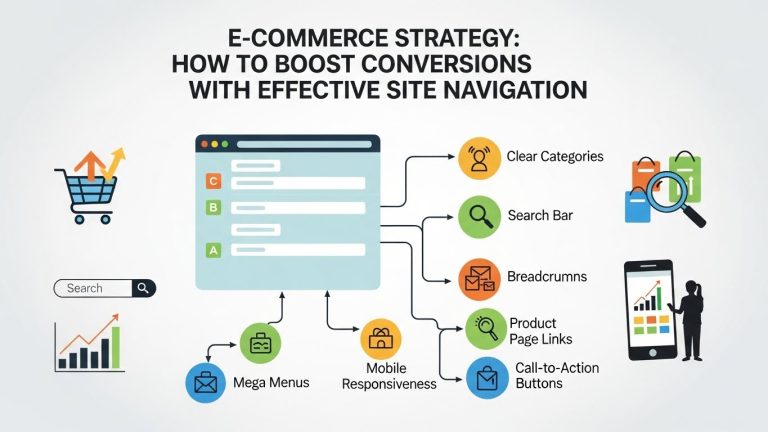
The cornerstone of effective navigation is simplicity. Overcomplicated menus can overwhelm users. Instead, opt for a clean and straightforward design that clearly displays primary categories and subcategories. Use descriptive labels that reflect the content accurately. For instance, instead of generic labels like “Products”, use specific terms such as “Men’s Apparel” or “Home Decor”. This clarity helps users immediately identify where they need to go.
2. Consistent Layout
Consistency in navigation design across all pages is crucial. Users should feel comfortable and confident as they explore your site. Maintain uniformity in menu placement, style, and structure throughout your website to provide a cohesive experience. This consistency not only aids navigation but also enhances brand recognition.
3. Mobile-Friendly Design
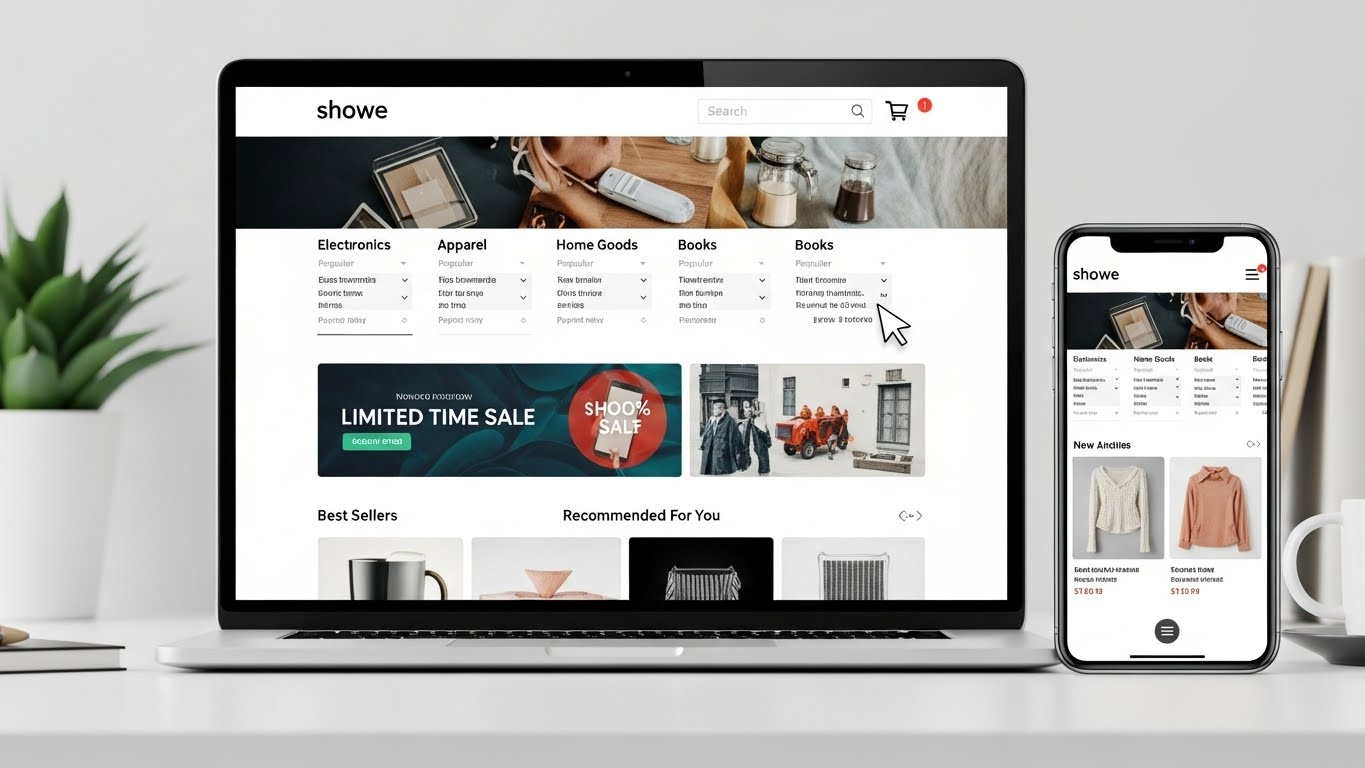
With the rise of mobile shopping, your site navigation must be responsive and user-friendly on all devices. Implement a mobile-first design approach, ensuring that navigation elements are easily accessible on smaller screens. Consider using collapsible menus and large, tappable targets to enhance mobile usability.
Advanced Navigation Features to Boost Conversions
1. Search Functionality
A powerful search function is essential for modern e-commerce sites. It acts as a shortcut for users who know exactly what they’re looking for. Implement a search bar that supports autocomplete suggestions and filters to refine search results. Ensure it’s prominently placed, typically at the top of the page, where users expect to find it.
2. Breadcrumb Navigation
Breadcrumbs provide a secondary navigation aid, showing users their current location within the site’s hierarchy. This feature is particularly useful on large e-commerce sites with numerous categories and subcategories. Breadcrumbs not only help users backtrack easily but also improve site SEO by establishing a clear content hierarchy.
3. Mega Menus
For e-commerce sites with extensive product ranges, mega menus can be a game-changer. Unlike traditional drop-down menus, mega menus display multiple options at once, often with images or additional context. This allows users to see a broader view of available categories and make more informed navigation choices.

Designing for User Experience
1. Visual Hierarchy
Utilize visual cues to guide users through your site. Elements such as font size, color contrast, and whitespace can draw attention to important navigation links. Create a visual hierarchy that highlights key sections, making it easier for users to focus on what matters most.
2. Testing and Optimization
Navigation design is not a one-time task. Regularly test and optimize your navigation elements to ensure they meet user needs. Use A/B testing to compare different navigation structures and analyze user behavior through heatmaps and session recordings. Continuous optimization can help identify and resolve navigation pain points.
Integrating Navigation with Overall E-commerce Strategy
Site navigation should be seamlessly integrated into your broader e-commerce strategy. Align navigation elements with marketing campaigns, seasonal promotions, and new product launches. Dynamic navigation that adapts to current business priorities can drive users toward high-value areas of your site, enhancing both engagement and conversions.
Case Studies: Successful E-commerce Navigation
Several leading e-commerce platforms have mastered the art of navigation. For example, Amazon employs a powerful search engine combined with a detailed category tree, allowing users to filter options extensively. Similarly, Shopify stores often use simple, clean navigation with prominent search features tailored to specific niches. These examples illustrate how effective navigation can enhance user experience and drive sales.

Conclusion: The Path to Enhanced Conversions
Effective site navigation is a critical component of any successful e-commerce strategy. By emphasizing simplicity, consistency, and user-centric design, businesses can create a seamless shopping experience that not only satisfies customers but also boosts conversions. As consumer expectations evolve, continuous testing and adaptation of navigation strategies will remain vital. Prioritize navigation as a key asset in your e-commerce toolkit, and watch as it drives engagement, satisfaction, and revenue growth.
Future Trends in E-commerce Navigation
1. Personalization
As technology advances, personalization in navigation is becoming increasingly viable. By leveraging data analytics and AI, e-commerce platforms can offer personalized navigation experiences. For instance, returning customers might see a homepage tailored to their previous browsing habits or recommended products based on past purchases. This level of personalization can significantly enhance user engagement and conversion rates.
2. Voice-Activated Navigation
With the growing popularity of voice-activated devices, integrating voice search and navigation into e-commerce sites is becoming more relevant. This technology allows users to browse and search using voice commands, offering a hands-free, convenient shopping experience. As voice recognition technology continues to improve, it will become a critical component of user-friendly navigation strategies.
3. Augmented Reality (AR) Navigation
Augmented reality is set to revolutionize how users interact with online stores. Imagine a virtual shopping environment where users can navigate through a 3D representation of a store, selecting products with a tap. AR not only enhances the shopping experience but also provides a unique and engaging way for users to interact with products, potentially increasing conversion rates.

Common Navigation Pitfalls and How to Avoid Them
1. Overloading Menus
One of the most common mistakes in site navigation is overloading menus with too many options. This can lead to decision paralysis, where users feel overwhelmed by choices. To avoid this, prioritize key categories and use a hierarchical structure to organize subcategories logically. Providing a clear path with fewer, more relevant options can improve user decision-making and streamline the shopping experience.
2. Ignoring User Feedback
User feedback is a valuable resource for improving navigation. Ignoring this feedback can result in persistent navigation issues that frustrate users. Implement feedback mechanisms, such as surveys or feedback forms, to gather insights directly from your audience. Use this data to continually refine and adapt your navigation strategy to better meet user needs.
3. Neglecting SEO Considerations
Navigation plays a significant role in SEO, influencing how search engines crawl and index your site. Avoid using navigation structures that hinder search engine accessibility, such as overly complex JavaScript-based menus. Instead, ensure that your navigation is search engine friendly, using simple HTML and clear, descriptive links. This will help improve your site’s visibility and organic search rankings.
Practical Tips for Optimizing Site Navigation
1. Conduct User Testing
User testing is an essential step in developing effective navigation. By observing real users as they interact with your site, you can identify areas of confusion or difficulty. Use these insights to make informed improvements, ensuring that your navigation aligns with user expectations and behaviors.

2. Utilize Heatmaps and Analytics
Analytics tools and heatmaps provide valuable data on how users interact with your site. These tools can reveal which navigation elements are most frequently used and which are often ignored. By analyzing this data, you can optimize your navigation to highlight popular links and eliminate or reposition underperforming ones.
3. Keep Up with Industry Trends
The e-commerce industry is constantly evolving, and staying informed about the latest trends can give you a competitive edge. Regularly review industry publications, attend webinars, and participate in online forums to stay updated on new navigation techniques and technologies. Applying the latest best practices can help ensure your navigation remains cutting-edge.
Conclusion: Navigating Toward Success
Effective site navigation is a vital component of a successful e-commerce strategy. By focusing on simplicity, consistency, and user-centric design, businesses can create a seamless shopping experience that enhances user satisfaction and boosts conversions. As technology continues to evolve, staying ahead of trends such as personalization, voice-activated navigation, and augmented reality will be crucial.
By avoiding common pitfalls, leveraging user feedback, and continually optimizing based on data insights, you can ensure that your site navigation remains a powerful tool for driving engagement and sales. As you navigate your e-commerce journey, remember that the ultimate goal is to guide users effortlessly from discovery to purchase, turning browsers into loyal customers and paving the way for sustained business growth.